
Cinematic AI Video Creation with MotionControlAI
Achieve perfect character consistency, precise facial expressions, and deliberate camera movement. Map any driving video onto your reference image to generate production-ready shots instantly.
Witness Unprecedented MotionControlAI by Top Creators
Execute Perfect Video Sequences in 4 Steps
A professional pipeline designed for absolute character consistency, nuanced movement, and predictable camera behavior.
Source a Flawless Reference Frame
Initiate your motion control sequence with a high-fidelity portrait exhibiting clean anatomy and unobstructed facial features.
Acquire the Driving Motion Video
Inject your intended action, rhythm, and nuanced expression into the system by uploading a clean driving video.
Enable Element Binding & Prompt
Lock core identity with motion control element binding, then append precise text prompts detailing cinematic camera language.
Render, Inspect, and Calibrate
Evaluate the initial output for temporal smoothness. Iterate methodically, isolating one creative variable at a time.
Advanced Workflow Capability Showcases
Discover the immense potential of applied AI animation across varied scenarios. Witness pure action transfer from element driving videos to absolute identity references.
Complex Garment & Spatial Tracking
Witness how advanced synthesis faithfully preserves elaborate clothing and accessories while flawlessly transferring physical posture from the driving source.
Inputs

Reference Portrait Anchor
Base portrait providing stable character identity & texture.
Driving Motion Control Source
Source clip providing the driving expression and physical action.
Outputs
Subtle Facial Expression Transfer
Observe how extreme algorithms capture delicate micro-expressions and blinks, seamlessly anchoring them to the reference identity.
Inputs
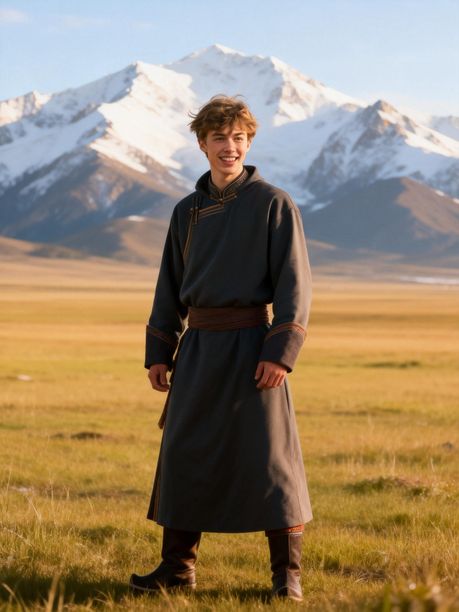
Identity Reference Baseline
Highly detailed portrait with specific lighting and skin texture.
Micro-Dynamics Motion Source
Driving performance emphasizing facial micro-dynamics.
Outputs
Dynamic Body & Camera Movement
Experience precise spatial understanding as the system seamlessly maps body twists and complex hand interactions without anatomical hallucination.
Inputs
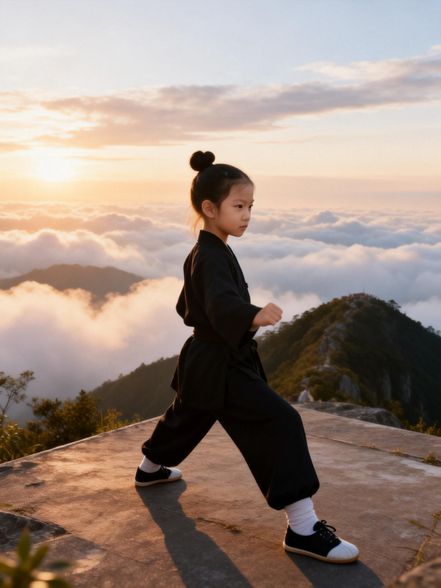
Intricate Character Reference
Character design containing intricate anatomy details.
High-Occlusion Motion Element
Complex body movement including limb occlusions.
Outputs
Why Professionals Demand Strict MotionControlAI
From primary drafting to final render, our workflow equips creative teams to scale production with unwavering identity, deliberate camera logic, and repeatable quality.
Unwavering Generation Consistency
Command your video generation from a singular reference image, completely locking facial identity across severe angle shifts and long-form sequences.
Motion Control via Source Video
Trigger your pipeline purely through raw uploaded footage, directly mapping authentic human action to your stylized subject.
Element Binding for Absolute Precision
Mandate element binding within your operations to maintain strict character fidelity during highly dynamic cinematic framing.
Pre-Calibrated Camera Presets
Inject deliberate zoom, tilt, and localized tracking logic into your recipe to guarantee every output aligns with your visual grammar.
Accelerated Iteration Cycles
Archive your exact motion control parameters—including prompt structures and element binding thresholds—to drastically reduce frustrating retries.
Scalable Production Teams
Centralize your organization's entire generation database, sorting by specific campaign and temporal intent, enabling seamless editorial collaboration.
FAQ
A complete, keyword-focused guide to motion control and its variants, based on public Kling documentation and production-tested workflows.
At its core, motion control is the groundbreaking technology allowing creators to define precisely how a subject moves and acts within an AI-generated video. Today, this tool acts as the bridge between static assets and a dynamic performance. By leveraging a robust AI motion control framework, you dictate the physical action of the shot.
For digital artists, integrating this technique improves production outcomes. First, it maximizes character consistency, keeping clothing and identity rock-solid. Second, it guarantees predictability; a successful prompt can be reliably repeated. Third, utilizing this workflow drastically reduces failed generations. Mastering motion control is mandatory for professional video production.
Selecting the right generation model is essential for optimizing your video pipeline. Kling 2.6 established a powerful baseline for full-body synchronization, proving itself as a highly reliable engine for everyday motion control tasks. If you create standard social clips, this version remains incredibly efficient, offering fast generation times.
Conversely, Kling 3.0 represents a leap forward, engineered for challenging visual scenarios. It introduces superior element binding logic, handling edge cases like profile turns and facial occlusion with unprecedented fidelity. If your project demands subtle micro-expressions or dynamic camera angles, upgrading yields noticeably superior results. Both deliver exceptional motion control; your choice depends on whether your scene requires foundational macro-action (2.6) or cinematic micro-consistency (3.0).
A professional pipeline thrives on standardization. Step one: pick a high-resolution, cleanly lit reference image. Step two: select your action source material, such as a freshly uploaded driving video. Step three: map the source action to your target subject, ensuring structural proportions between the driving actor and reference image are not vastly mismatched.
Step four involves refining your prompt context to provide linguistic scaffolding for the scene’s mood and background. Step five is the generation phase. To make your process reproducible, maintain a detailed project template: rigidly document reference image quality, configuration presets, and successful prompt structures. Teams that productize motion control via this methodology eliminate guesswork.
Asset quality is the biggest factor dictating whether your generation feels premium. For your static reference images, prioritize frontal portraits, balanced lighting, and minimal compression artifacts. For your driving video inputs, utilize very clean, rhythmic motion and strictly avoid unpredictable jitter or heavy motion blur.
The absolute best motion control outcomes emerge from geometric alignment between the source action and target identity. If a physical source action is too extreme for a realistic target framing, severe identity drift inevitably appears. Build a strict raw asset checklist and reject low-quality inputs early. This pre-production discipline improves reliability exponentially.
Element binding is arguably the most critical algorithmic layer inside advanced motion control pipelines. It digitally anchors the generated subject to specific visual features, ensuring localized identity remains completely stable during temporal movement. Video outputs utilizing strict element binding exhibit drastically stronger facial consistency than those without it.
When creative teams treat element binding as a mandatory standard, they instantly reduce common failure modes like face melting and grotesque character deformation. For creators producing branded avatars, element binding transforms motion control from an unpredictable tool into a robust production utility.
Cinematic camera language matters just as much as flawless character movement. Leveraging predefined options—such as smooth zoom in, dramatic zoom out, or low-angle camera down—provides a strictly stable visual grammar. Use a zoom-in preset when deep emotional emphasis matters. Employ vertical camera logic for perspective shifts, and rely on a fixed position to evaluate clean character performance.
A frustrating amateur mistake is blindly stacking aggressive camera shifts on top of already dense character action. This overloading increases visual artifacts and destroys consistency. Instead, lock the human subject's performance first using motion control, and only then iteratively inject camera movement intent.
True, high-quality video generation is ultimately judged by its survival in severe edge cases: rapid profile turns, explosive head movements, and temporary facial occlusion. Modern motion control architectures preserve facial identity remarkably well across these hostile situations using physically aware models.
To maximize consistency, editors must launch from a pristine reference portrait, apply perfectly mapped action intensity, aggressively enable element binding toggles, and employ incredibly specific prompt cues regarding the core identity features. If your output fractures under heavy occlusion, systematically reduce the physical action complexity before initiating the next run.
Absolutely. Systematized motion control workflows are highly lucrative for commercial organizations that mandate strict visual compliance and predictable output quality. For high-volume product advertisements and educational funnels, these tools actively empower teams to maintain rigid character consistency while seamlessly adapting movement and emotion. This completely eliminates expensive reshoot risks.
Furthermore, from a strategic SEO operations perspective, deploying an institutional motion control pipeline supports massive algorithmic content scaling. Marketing teams can rapidly produce tightly coherent video families engineered around a lucrative keyword cluster, perfectly align landing-page copy, and enforce visual continuity. Establishing this proprietary pipeline hands your marketing executives an immensely powerful distribution system.
Master AI Motion Control Today
Supercharge your creative studio with the industry's most robust animation framework — completely free to launch.